
Updating descriptions manually in YouTube Studio is a slow, tedious process—especially editing multiple videos at once. Fortunately, tools exist to help you edit hundreds of videos automatically with just a few clicks. In this guide, we compare every bulk edit tool so you can pick one that fits your workflow and gets the job done fastest.
Contents
- Why bulk edit YouTube descriptions?
- The problem with manual edits
- Update descriptions faster with bulk edit tools
- The best bulk edit tools at a glance
- YouTube Studio (manual editing)
- YouTube Studio (bulk editing)
- TubeBuddy (free)
- TubeBuddy (paid)
- editbulk.com (free)
- editbulk.com (paid)
- What's the best tool to bulk edit YouTube descriptions?
Why bulk edit YouTube descriptions?
Whether you're a creator or channel manager, these are the most common reasons to bulk edit video descriptions:
- Affiliate links: these suggest products related to the video and earn commission. When an affiliate link changes or goes out of date you need to update it across every video in which it appears.
- Promotion links: these promote a creator's own courses, ebooks, coaching, or other products. When a promotion period ends you need a simple way to remove or replace every link.
- Disclaimer text: copyright, fair use, or disclaimer text may appear identically across multiple descriptions. When the wording changes, you need to update every relevant video.
Whether updating descriptions is something you do every day or hardly ever, what's wrong with simply using YouTube's default tools?
The problem with manual edits
If your channel has just a few videos, changing the descriptions is straightforward. Just open the video details in YouTube Studio, edit the description, then hit Save.
It takes less than 30 seconds.
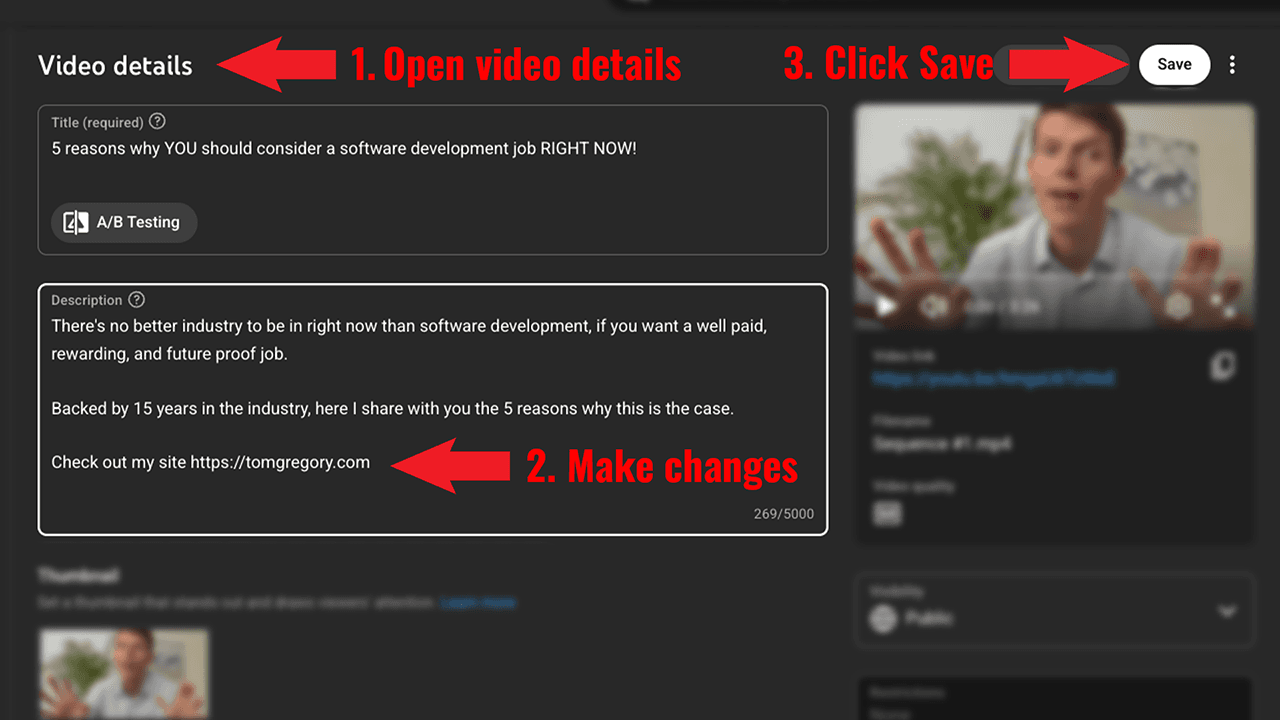
But imagine you have tens, hundreds, or even thousands of videos.
To repeat the same manual steps for every video could take hours. Even worse, you might become tired, careless, and make mistakes that mean viewers see the wrong description.
That's why anyone with an established YouTube channels is fed up of:
- Wasting time opening dozens of browser tabs, copy and pasting text, and clicking the Save button in a process that should be automated.
- Broken links that expired months ago, but weren't updated because it was too much effort.
- Outdated descriptions resulting from a frustrating, manual process that they or their team simply choose not to do.
Sounds familiar? Thankfully, anyone looking for an easier way to update descriptions now has some alternatives.
Update descriptions faster with bulk edit tools
Bulk edit tools are specifically designed to update multiple descriptions in one go.
By automating the manual clicking and copy/pasting, updates that took hours can be completed in minutes.
Many creators don't realise that basic bulk editing is already built into YouTube Studio. More advanced tools have also sprung up to streamline the process further, including TubeBuddy and editbulk.com.
To understand the tradeoffs, we'll repeat the same real-world find and replace task for each. By comparing the results, we'll see which is the best bulk edit tool.
The best bulk edit tools at a glance
| Type | Best for | Pricing | |
|---|---|---|---|
| YouTube Studio | Website | Manual editing or very simple bulk edits | Free |
| TubeBuddy | Browser plugin | Unlimited bulk editing for those happy to pay | Free or $32.99/month |
| editbulk.com | Website | One-off bulk editing tasks | Free or $3 for 30,000 credits |
YouTube Studio (manual editing)
Best for updating a few videos manually
YouTube Studio (manual editing) pros:
- You see exactly what changes you're making
YouTube Studio (manual editing) cons:
- Slow & tedious
- Prone to errors
YouTube Studio is most creators' go-to method for updating a single description.
Under Video details, you simply update the description exactly how you like, then hit Save. This works fine for a few videos, but for bigger jobs a dedicated tool will save a tonne of time. Trust me—editing 100 videos manually isn't fun at all.
YouTube Studio (bulk editing)
Best for very simple bulk edits
YouTube Studio (bulk editing) pros:
- Tool already exists in YouTube Studio
YouTube Studio (bulk editing) cons:
- Applies changes to max. 50 videos at a time or all videos
- No find and replace feature
- Adding a newline requires a hack
YouTube Studio's bulk edit tool has a few features that are only really useful for simple use cases.
Although you can 'Insert at start', 'Insert at end', and 'Remove', there's no Find and replace feature. The only reason it worked for my videos was because the text to be replaced was at the end of the description. That meant I could do a 'Remove' action, followed by an 'Insert at end' action.
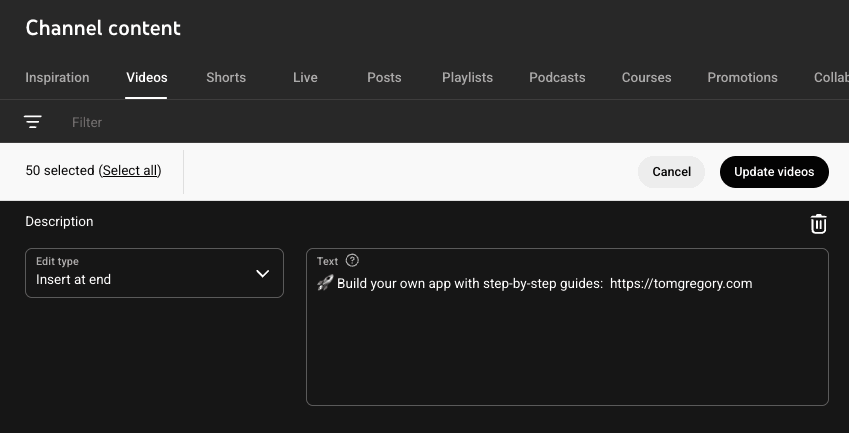
The tool either updates all videos on a channel or the specific videos you select. Since YouTube Studio only shows 50 videos at a time, this meant I had to cycle through each page of videos and repeat the find and replace action.
TubeBuddy (free)
Best if you only need search
TubeBuddy (free) pros:
- Free search feature
TubeBuddy (free) cons:
- 'Find & Replace Text' only works on one video at once
- Buggy UI
TubeBuddy is an all-in-one tool best known for its SEO and optimisation features, but it also includes a handy Find & Replace Text tool.
Unfortunately, the free tier severely limits functionality—you can only update one video at a time. This makes the tool almost useless unless you're willing to upgrade to paid.
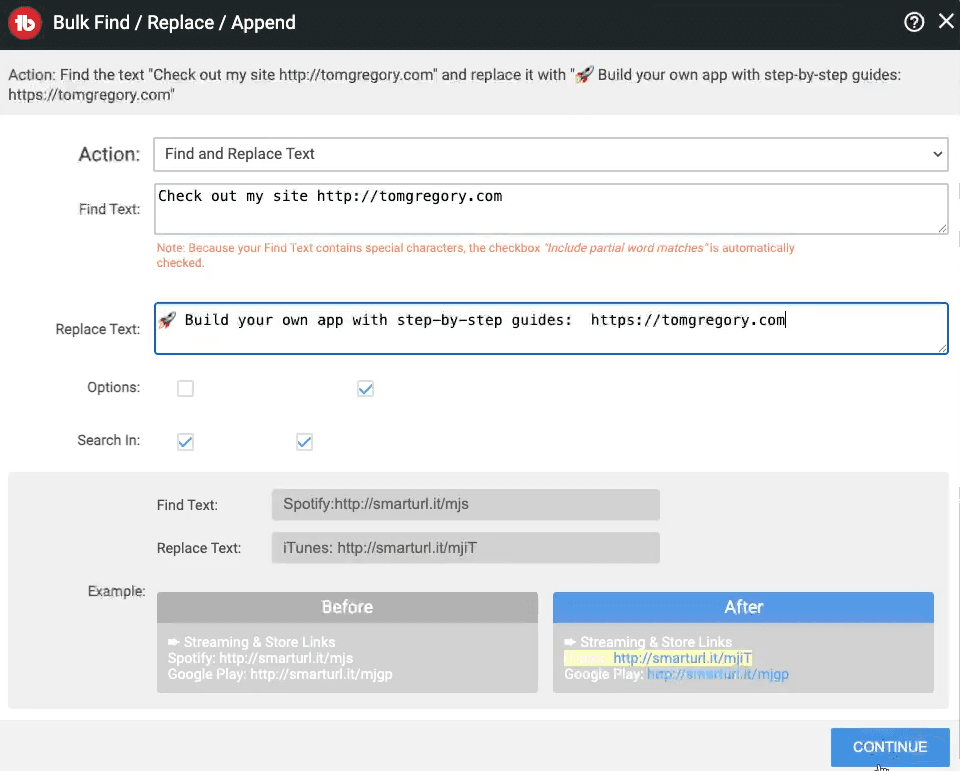
The silver lining? This feature perform unlimited text searches on descriptions for free. If you want to avoid upgrading, simply reference the search results and edit videos manually in YouTube Studio. And no—even I wasn't willing to do that for 100 videos.
TubeBuddy (paid)
Best bulk edit tool for unlimited edits
TubeBuddy (paid) pros:
- It just works
- Progress report
- Unlimited usage
TubeBuddy (paid) cons:
- Expensive at $32.99/month
- Buggy UI
To access TubeBuddy's full and unrestricted Find & Replace Text feature, you have to buy a Legend membership at $32.99/month.
Once upgraded, you can process as many videos as you like simultaneously. You simply provide the Find Text and Replace Text, select which videos to update, then watch progress reported live as the tool works in the background.
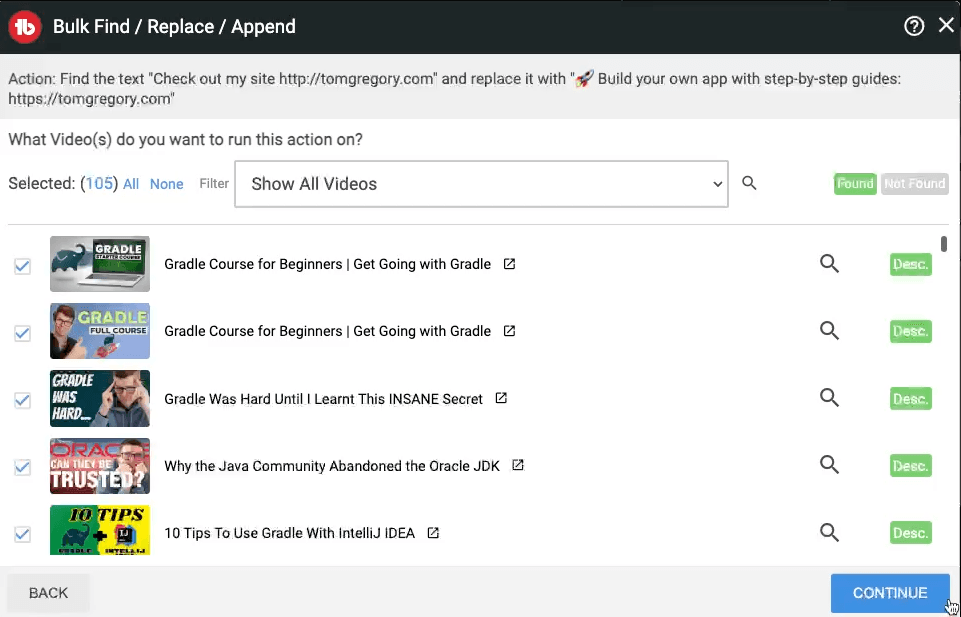
TubeBuddy doesn't specify any usage limits for its Find and Replace Text tool, beyond not processing more than 1,500 videos at once. This makes TubeBuddy ideal for anyone making frequent updates to video descriptions.
editbulk.com (free)
Best bulk edit tool for free edits
editbulk.com (free) pros:
- Highlights changes as they happen
editbulk.com (free) cons:
- Quota limit
editbulk.com is designed specifically for editing video descriptions and its free tier lets you update a limited number of videos.
Similar to TubeBuddy, you search for videos with specific text, then select which ones to update.
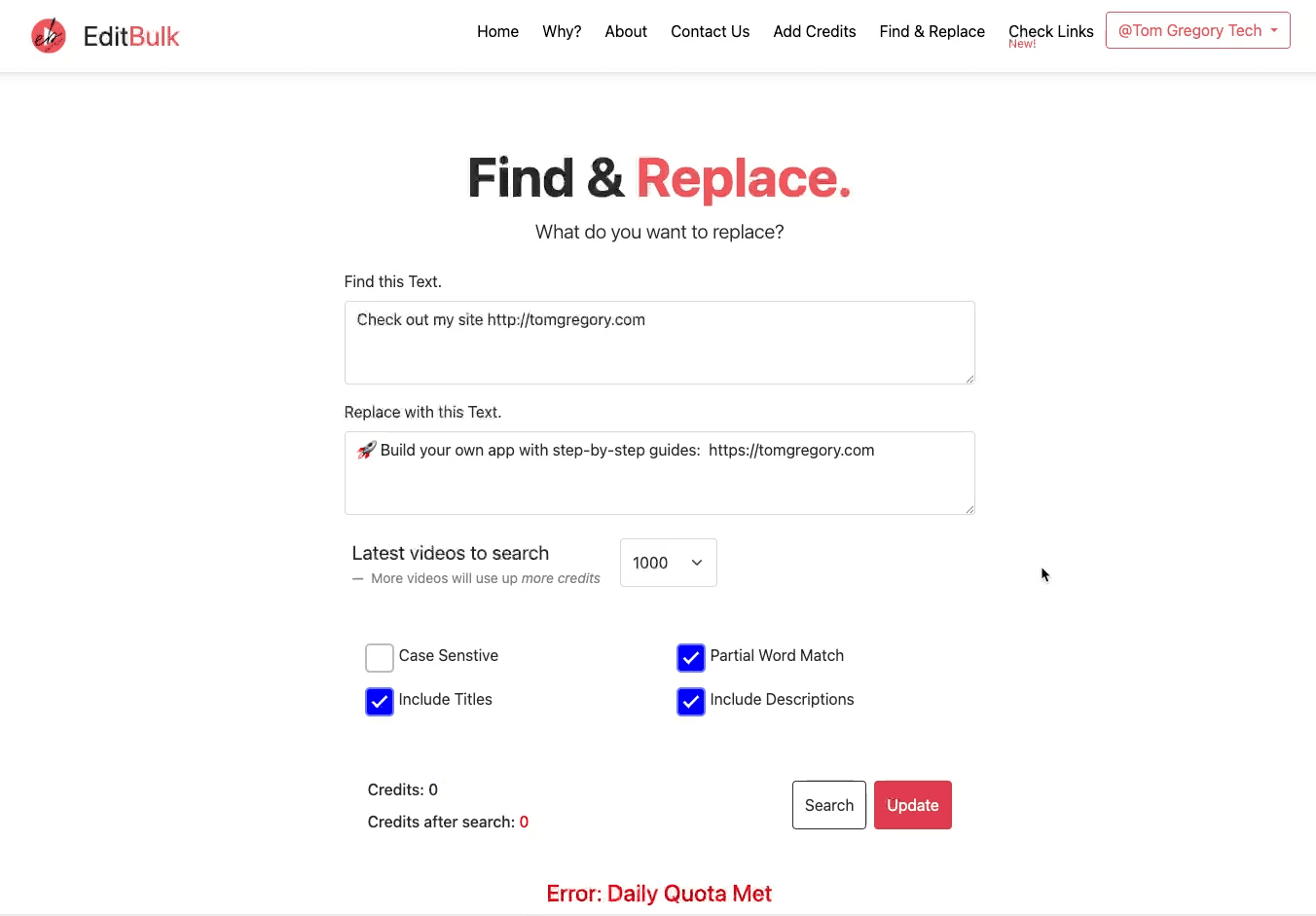
The free tier gives you 2,000 credits per day, used for both searches and updates. In my case, this let me edit up 83 videos for free, with any videos not updated clearly labelled in the progress report.
editbulk.com (paid)
Best bulk edit tool for one-off jobs
editbulk.com (paid) pros:
- Highlights changes as they happen
- Low-cost one-off payment
- Fastest updates
editbulk.com (paid) cons:
- Limited quota
For $3/month, editbulk.com gives you 30,000 credits per day so you can start updating hundreds of videos at once.
Simply specify your find and replace text, then sit back as the tool does its job. You can see updates applied in real time, with successful edits highlighted in green.
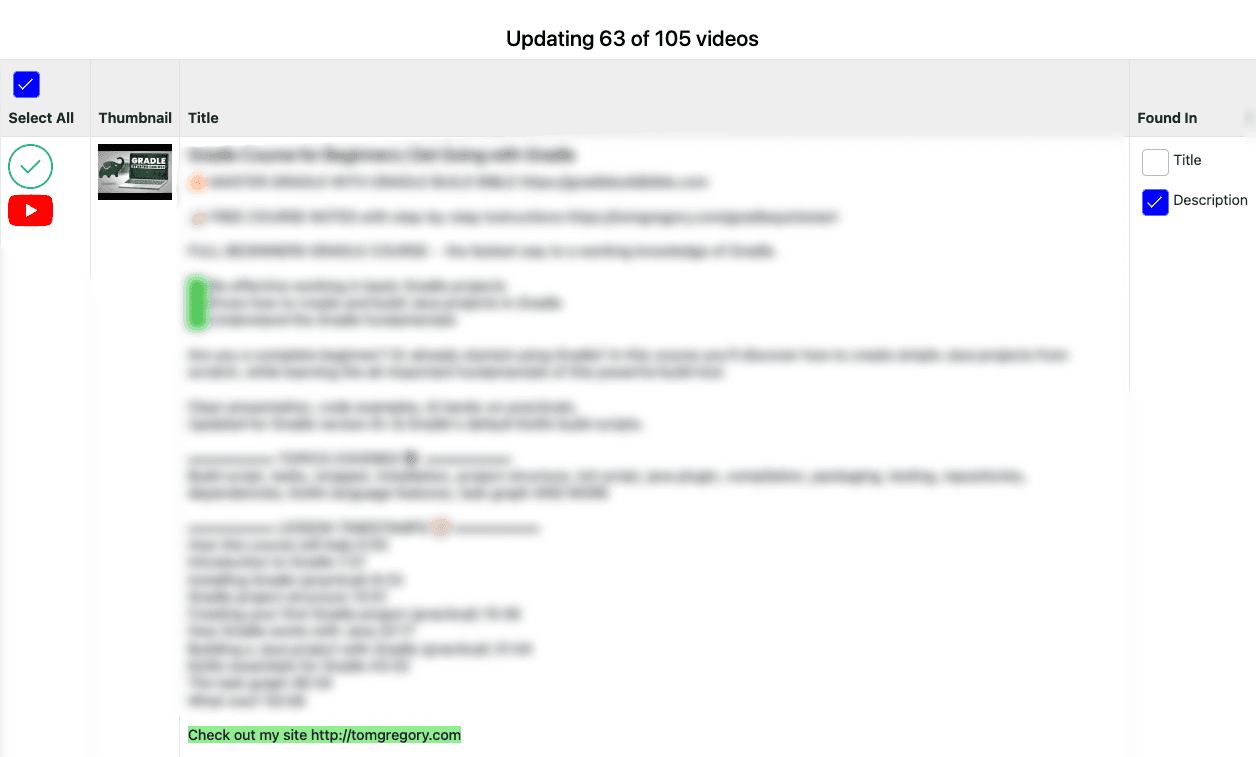
The 30,000 credits equates to doing a find and replace across 372 videos. Whether that's more cost effective than TubeBuddy depends on your use case, but for one off jobs the low price tag is ideal.
Even better, editbulk.com was the fastest tool to edit the 100 videos in my testing.
What's the best tool to bulk edit YouTube descriptions?
Bulk editing descriptions is a task every YouTube creator eventually faces—and with the right tool it's way less painful. Updates to fewer than ten videos can be done manually in YouTube Studio. For up to 80 videos, try editbulk.com's free tier. For more than 80 videos, I recommend upgrading to the paid tier of either TubeBuddy or editbulk.com. By picking the most suitable tool for job, you'll keep your video descriptions up-to-date and save hours that you can put to more creative tasks.